Many people in India do not know how many SIM card linked with my Aadhaar, which can be risky if unknown mobile connections are issued in your name. To solve this problem, the Government of India and TRAI have introduced an official online service called the TAFCOP portal, where you can easily check how many SIM cards are linked with your Aadhaar card and report unauthorized numbers.
Want to know how many SIM card linked with my Aadhaar? Use our free online tool to check SIM cards linked with Aadhaar and verify all mobile numbers issued in your name through the official verification portal.
Let’s learn about this in detail and step by step. To make sure you don’t miss anything, you’ll need to read this entire article. Otherwise, you won’t understand the process.
A few months ago, something strange happened to me. One day, I noticed that some money was deducted from my bank account without any clear reason. At first, I thought it might be a technical issue.
Read More: OPPO Watch S Features and Battery Life: Full Review & Specifications
But when I contacted my bank, they told me something shocking — an OTP had been sent to a mobile number that I was not using regularly. That moment made me seriously wonder how many sim card linked with my aadhaar, because I was sure I had shared my Aadhaar details only for one mobile number.
That moment made me think seriously:
How Many SIM card linked with my Aadhaar? – Why This Tool Is Useful
Later, I also realized that sometimes important OTPs were reaching a different number, not my primary one. That’s when I understood how risky it can be if unknown SIM cards are registered using your Aadhaar card.
After researching, I found that the Government of India and TRAI provide an official solution to check this — the TAFCOP portal.
Then I decided that what was happening to me shouldn’t happen to anyone else. After doing some research, I came up with the idea for a tool that could help people who have been victims of this kind of thing.

And then I decided to create a simple SIM check tool on this website.
Most users don’t regularly check how many SIM cards are linked with their Aadhaar. Because of this:
- Unknown numbers may stay active
- OTPs can reach unused SIMs
- Risk of financial misuse increases
That’s why on techsoch.org, we provide a simple tool that helps you start the checking process easily.
Know the Number of Connections Issued in Your Name
When I personally checked my details using this process, I found more than one mobile connection associated with my identity — even though I was actively using only one.
This can happen due to:
- Old SIM cards not deactivated
- SIM cards taken years ago
- Number re-issuance by operators
That’s why it’s important to regularly verify the number of connections issued in your name.
TRAI Mobile Number Check Aadhar Card – How It Actually Works
When I started searching for a reliable way to verify my mobile connections, I came across the option of TRAI mobile number check Aadhar card. Many people think this process is complicated, but in reality, it is quite simple if done through the correct verification system.
Under telecom regulations in India, mobile numbers issued in a user’s name are monitored through a centralized consumer protection framework. This allows users to check mobile numbers linked with Aadhaar and identify whether any extra or unknown SIM cards are active.
Using this method, I was finally able to understand:
- How many mobile numbers are issued in my name
- Which numbers are active or unused
- Whether any number was linked without my knowledge
This TRAI mobile number check Aadhar card process helps users stay alert and avoid problems like OTP misuse, banking issues, or identity-related risks.
Important Note Before You Proceed Further
There are some official platforms created under Indian telecom regulations where users can get detailed information related to mobile connections issued in their name. These platforms provide deeper verification and allow users to view complete details in a secure way.
However, many people face confusion while using this process for the first time. If you feel any difficulty during verification, you can use this tool, which will guide you and redirect you directly to the relevant verification page.
That said, I strongly recommend reading this article till the end. I have covered important points, step-by-step explanations, and practical tips based on my own experience. These points will help you understand how the process works, so that when you reach the verification page, you already know what to check, where to click, and how to avoid mistakes.
What Is TAFCOP Portal? (Simple Explanation)
TAFCOP is a telecom consumer protection system that helps users:
- Check mobile numbers linked with their identity
- Prevent misuse of telecom connections
- Maintain transparency in mobile registrations
Our tool connects users to this system in a guided way.
TAFCOP Portal Aadhaar Card Mobile Number – What You Should Know
The final verification and SIM details are shown on an official telecom verification portal that works under Indian telecom regulations.

Our tool simply helps users reach the correct verification system easily, without confusion or wrong links.
Check SIM Cards Linked with Your Aadhaar
Enter your active mobile number to start the verification process.
Verifying details… please wait 10 seconds.
This tool helps you reach the verification process. OTP may be required on the next page.
Read Also : LG Gallery TV Features and Specifications: A Design-First Alternative to Samsung Frame TV
How to Report Unknown SIM Cards
If you notice any number that you don’t recognize:
- Mark it as not required
- Submit the request
- The concerned operator will review and take action
This will protect both your Aadhaar and mobile identity.
Important Tips From My Personal Experience
- Always keep bank & Aadhaar linked to one main number
- Avoid sharing Aadhaar details unnecessarily
- Deactivate unused SIM cards
- Check your linked SIMs every few months
How This Tool Works (Important to Read First)
When you use our tool on this page, it does not check or store your personal details directly.
The purpose of this tool is to guide you step by step and help you reach the official government verification page, where the actual checking process takes place.
As soon as you complete the steps in our tool, you will be redirected to the official portal, where you can safely verify how many SIM cards are linked with your Aadhaar.
That is why it is important to read the full guide below — I have explained each step clearly so you don’t get confused once you reach the official website.
Step‑by‑Step Guide: How to Check SIM Cards Linked With Your Aadhaar
Once you are redirected from our tool, follow these steps carefully on the official page.
Step 1: Enter Your Mobile Number
On the official page, you will see a field asking for your mobile number.
Enter the same active mobile number that is linked with your Aadhaar card.
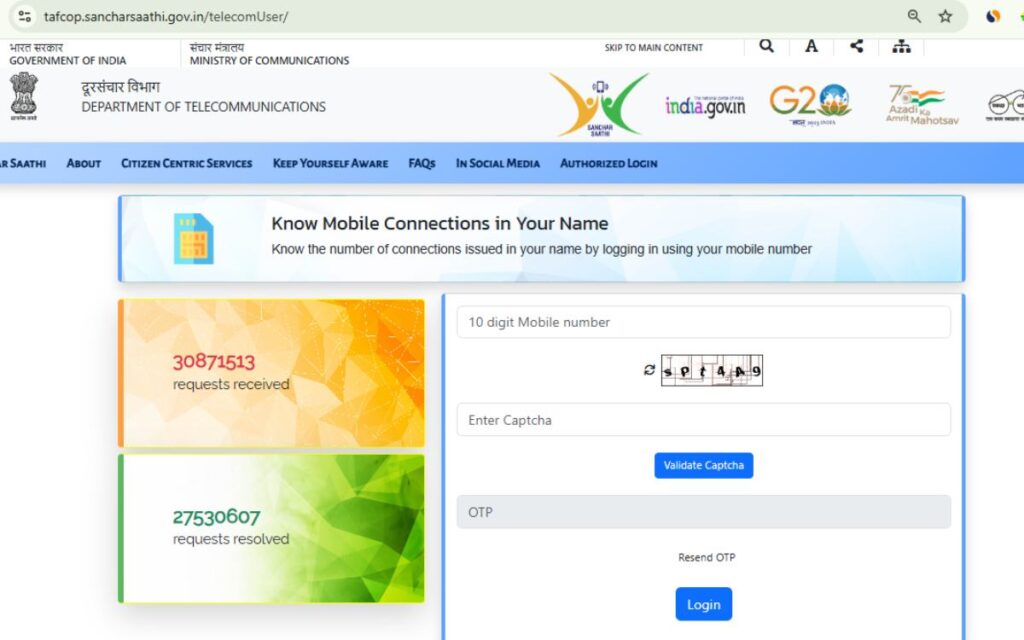
Make sure this number is with you, as you will receive an OTP on it.
Step 2: Request OTP
After entering your mobile number, click on the Request OTP or Generate OTP button.
Within a few seconds, you will receive a one‑time password (OTP) on your phone.
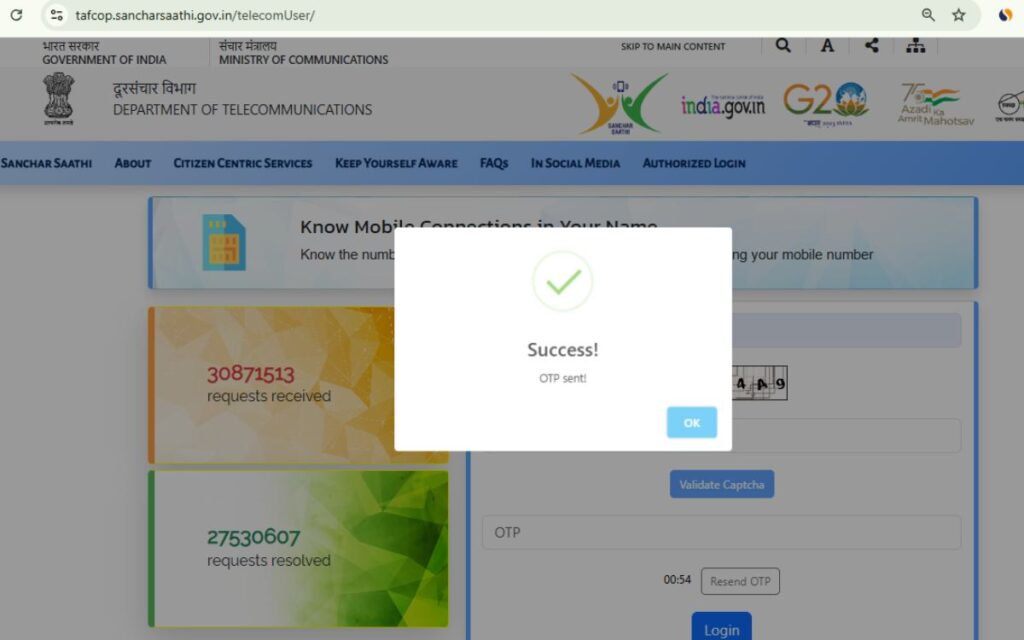
Step 3: Verify OTP
Enter the OTP exactly as received and submit it for verification.
This step is required to confirm that you are the genuine owner of the mobile number.
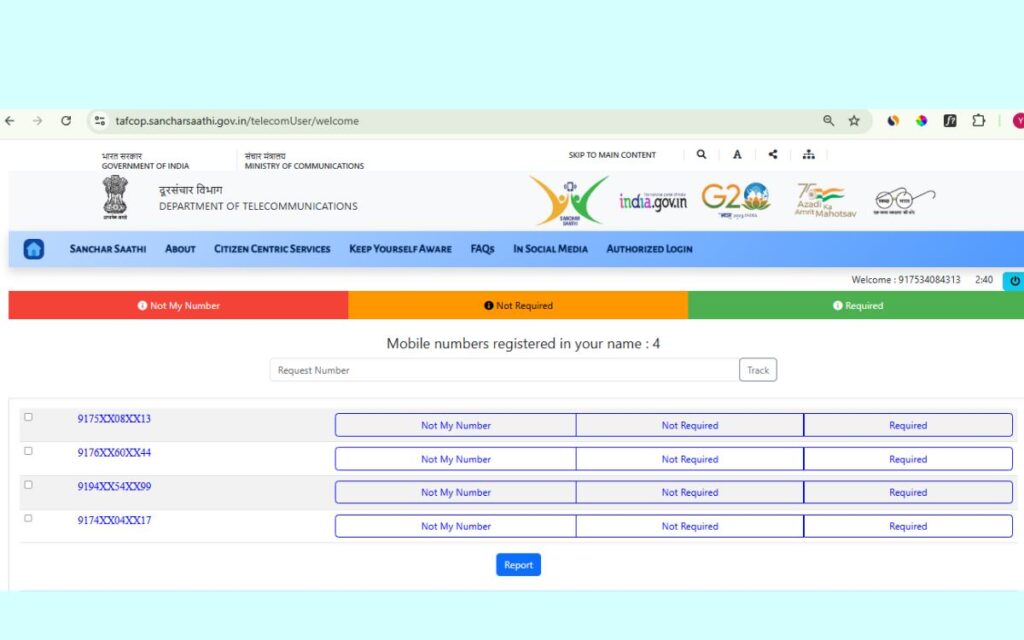
Step 4: View All Mobile Connections
After successful OTP verification, the website will show a list of all mobile numbers issued in your name.
Here you can see:
- How many SIM cards are linked with your Aadhaar
- Which numbers are active
- Whether any unknown or unused number is present
Step 5: Report Unknown or Unwanted Numbers
If you find any mobile number that:
- You do not recognize
- You are no longer using
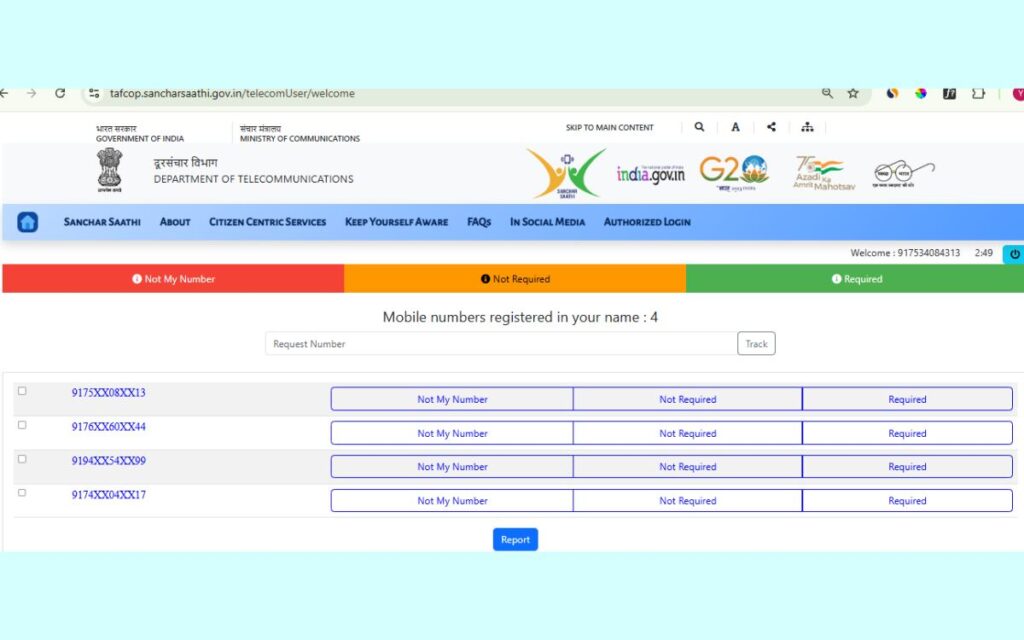
You can now select the appropriate option such as "This is not my number" or "Not needed" and submit the request.
The respective telecom operator will then review and take action.
Why Reading This Guide Matters
Many users reach the official portal but get confused about:
- Which number to enter
- Why OTP is required
- What to do after seeing the list of numbers
That’s why I created this tool and guide — so when you reach the official website, you already know exactly what to do without any confusion.
Important Note for Users
- This tool only helps you reach the official verification process
- We do not collect, save, or process any personal data
- All verification happens only on the official government website
FAQs – Aadhaar Linked SIM Card Check
What is TAFCOP portal used for?
The TAFCOP portal is used to check how many SIM cards are linked with your Aadhaar card and report unauthorized mobile connections.
How many SIM cards can be linked with one Aadhaar?
As per current telecom rules, a limited number of SIM cards can be issued per Aadhaar, depending on the circle and operator.
Is TAFCOP portal a government website?
Yes, it is an official portal managed by TRAI under the Department of Telecommunications (DoT).
Can someone misuse my Aadhaar to get a SIM card?
Yes, if Aadhaar is misused, unauthorized SIM cards can be issued. That’s why checking regularly is important.
Read Also : OPPO Watch S Features and Battery Life: Full Review & Specifications
Final Words
After my personal experience, I strongly recommend everyone to check how many SIM card linked with my Aadhaar at least once. It hardly takes 2–3 minutes, but it can save you from serious problems like financial fraud and identity misuse.
This small step can protect your Aadhaar, your bank account, and your peace of mind.

- Word Counter Tool – Count Words, Characters & Reading Time

- What is Project Management? 5 Best Project Management Tools You Can Try

- 10 Must-Have Google Chrome Extensions for Maximum Productivity
- PS5 Digital Edition Price in India (2026) – Storage, Games Capacity & PS5 Pro Price

- Which AI Tool Is Best for SEO Writing (Honest Guide for Beginners)